Table of Contents
Real-World Examples of Cloud Computing Services 1
Cloud computing gives us endless opportunities to store, transfer, and manage data without compromising our local devices. Many of the services and applications we enjoy today wouldn’t be possible without the power of cloud application development services.
For instance, no one could imagine working remotely without giant storage and/or instant communication. But how else do cloud computing services affect our daily lives?
Here are 7 real world examples of cloud computing.
Amazon Web Services (AWS)
Amazon is a must-have tool for developers who are tasked with endless coding and other backend tasks. AWS provides seamless interfaces for running codes for any application without the need for servers. Formed under a pay-as-you-go model, AWS is flexible and scales according to a business’ growth in data demands.
Companies from different industries have used (and are still using) AWS, even popular ones like The Seattle Times and the Coca Cola Company.
Slack
Corporate folks and members of the start-up community know the collaboration tool Slack by heart. It offers ‘channels’ for communication – group messages that are organized per team or topic. Aside from messaging, these channels also have the capability to transfer files, host video calls, and integrate with other big-name cloud programs like Google Drive and DropBox.
Organizations big and small use Slack as their main correspondence, including NASA and Airbnb.
Egnyte
Transferring content across multiple devices can be risky especially for organizations with a low tolerance for security breaches. Egnyte is a cloud computing services platform that addresses exactly that by providing secure file-sharing options and reliable content governance. Users can upload and send files from any location without worrying about privacy.
Which known company uses Egnyte? No other than media brand Buzzfeed.
Carbonite
Diving deeper into data security, Carbonite is crucial for every company who needs protection against data loss and ransomware. In simple terms, Carbonite protects files within the cloud from security breaches – a task that any organizations struggle to do manually.
Zoom
During a time when everyone, including the office-going professionals, are expected to stay at home, Zoom made it possible for virtual huddles and online presentations. In fact, more than just on the corporate side, Zoom has also paved the way for online learning. Its features such as recording and cloud exporting is a way to make communication easier and more accessible to its users.
Industry giants like Slack and Uber all rely on Zoom for conference calls and meetings.
DigitalOcean
DigitalOcean is a cloud application development services platform that allows companies to deploy and scale products. In just a few seconds, these users can create virtual machines which are easily scalable based on their storage and traffic needs. It’s managed over the internet and is one of the growing popular options for delivering applications.
Which companies use DigitalOcean? WeWork and Slack are two examples that use IaaS.
DropBox
E-mail file sharing has its limits, and DropBox exists to fill that gap. By facilitating large transfers, it aids users in sharing files that e-mail and other communication programs can’t accommodate. It also allows full integration of different collaborative tools like Vimeo.
]]>This article is a brief overview of the different types of access tokens and their specific use cases. Read on to learn more about OAuth 2.0. Access tokens.
OAuth 2.0 Grant Types With Their Use Cases 1
- Authorization code grant
- Implicit grant
- Resource owner credentials grant
- Client credentials grant
- Refresh token grant
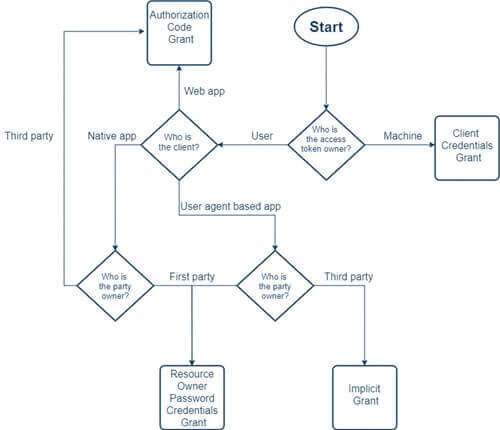
The way an application (be it a web app, naïve app, or server-to-server application) gets an access token is what a grant type means in OAuth 2.0. Access tokens are what allow access to specific defined server resources. In simpler terms, they grant permission to a client to access some protected resources.
If you are building a modern application, you would most likely want to know whether your end-user is authenticated or not to ensure that your APIs are protected from unauthenticated users. For this purpose, you can issue your authenticated users signed access tokens passed through your app to grant them access.
There are several ways (or grants) of acquiring access tokens. Let’s discuss these different grant types and their specific use cases to help you decide which type must implement to ensure the kind of experience you’d want your users to have.
1. Authorization code grant
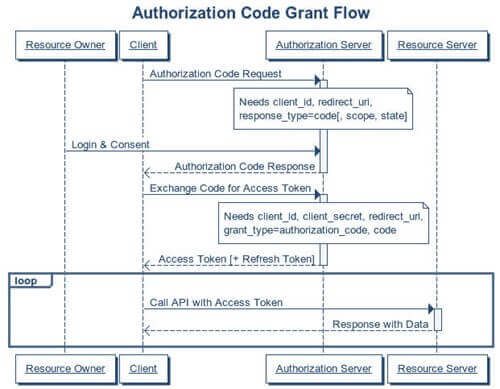
- Have you ever signed into application using your Facebook or Google account? If yes, the chances are that you’ve already come across this grant type.
- This grant type has a few benefits over the other types such as the access token remains invisible to the user, which means it is a highly secure way of passing the token back to the application.
- Response type=code, the client-id, redirect-uri, scope, and state are the authorization grant parameters used to build this grant type.
2. Implicit grant
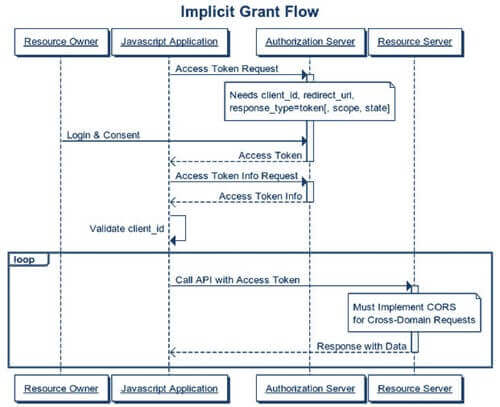
- The most appropriate use case for this grant type is a single-page JavaScript app which is easily accessible and doesn’t have a way to store client secrets safely.
- In this grant flow, the user is redirected to the authorization server which validates the parameters in the query string. After that, the use is required to login to the server and approve the app’s request. On accepting it, he gets redirected back to the application with an access token.
3. Resource owner credentials grant
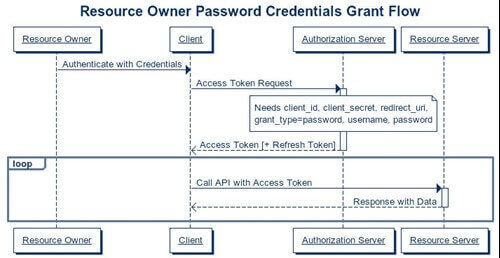
- This type of grant is suitable for clients who have a trust relationship with their resource owners and can obtain their credentials. Also, clients who use direct authentication schemes but want to migrate to OAuth can consider using this grant type.
- Both web and native device applications are suitable to acquire access token through this grant type.
4. Client credentials grant
- The best use case for this grant type lies for clients who want to obtain an access token outside the context of a user meaning they do not require the permission of a specific user to access data.
- To implement this grant type, the client requests an access token after which the app’s credential get validated. On successful validation, the access token gets returned to the client, and with the valid access token, the client calls the protected API.

5. Refresh token grant
Access tokens eventually expire, and with that, a client’s authorization of a user’s resource expires too. This is where the Refresh token grant comes into the picture and allows clients continued access to a user’s resource
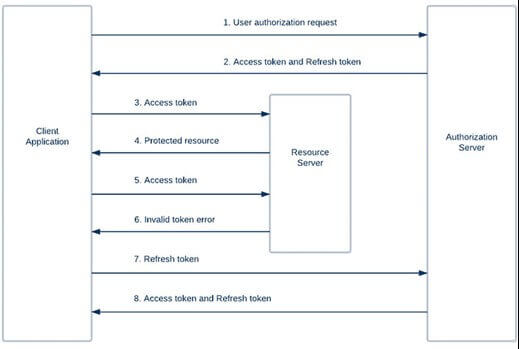
Table of contents
5 Key Basics of Application Infrastructure 1
IT infrastructure services matter now more than ever.
Today, almost everyone is working in their personal offices and outside the safety of the company umbrella. Thus, the risk of attacks and breaches are very high. You might think that a new app or another browser extension can help protect you from these threats—and they can—but it’s never too late to learn new things before buying into them.
We might look at an app and see the pretty colors and minimalist layout and think “Oh, that’s something my staff can understand” or “This will be easier for my customers to navigate.” But that’s just the Graphical User Interface (GUI)—the tip of the software infrastructure service iceberg. But underneath this facade is where all the important details lie.
So, before you subscribe to a random ad that tells you about this “secure” app for remote work, here are five key points about Application Infrastructure that you should know and ask about.
Intrusion Detection System (IDS) – Even though each application is unique, there are certain standards an application has to meet to ensure the security of an honest business owner and their well-paying customers.
The detection of threats is part of IT Safety 101. This is why having an IDS that monitors network traffic for suspicious activity could be critical to your day-to-day operations.
IDS are used to alert application managers and developers when there are attempted breaches or cyber attacks to the app. When you inquire about a software infrastructure service, ask about how it detects and responds to threats, and if users will get notified.
Web Server – Web-based applications are delivered through a web server that sends HTML and PHP files by using the HTTP communication protocol. A web server typically hosts the GUI through which users engage with the application. For example, Office 365 is an application that is accessible through a browser.
In terms of security, it is best to know how an application authenticates access and what the log-in requirements are, so you could ask about things such as two-step verification, face ID, and other things related to access.
Firewalls – Firewalls are used to block unauthorized access to assets and services, ensuring that users interact with the application exclusively through the web portal and cannot access other functions of the software infrastructure.
On top of your general internal IT infrastructure service, you should also consider the firewalls used by the third-party software you are acquiring.
Here you can ask about the range of access, and how it differs between customers, users, and administrators.
Application Server – One can opt for either a web-based server or an app-based one. An application server houses the application and business logic that makes the application work. The application server is typically hidden behind a firewall so that users can only interact with it through the presentation layer (GUI). An application server has components and features to support application-level services, such as Connection Pooling, Object Pooling, Transaction Support, Messaging Services, etc.
To simplify, examine your line of work and see if you need more than what a web-based server can provide. Web servers are suited for static content (e.g., emails and file storage) and app servers are for dynamic content (e.g., video editing and animation tasks).
File Storage/SQL Servers – Some applications that store data in files may incorporate a file storage server as part of their application infrastructure. Applications that need to access data in relational tables might use SQL servers to fulfill database functions.
It is important that you know the other apps that this software can collaborate with, and how deep it can access into a device’s database. Take for example, Microsoft and their apps that can work in links and can interact to a degree. Same goes for Office 365, where one can retrieve files from a user’s computer and have it sent through the online storage—given that it was granted permissions to upload.
Whether or not you are planning to keep the remote work setup even after we make it through the pandemic, the business world will continue to grow more and more digital and IT-dependent. Now that the world has slowed down a bit, take this chance to evolve and be one step ahead of the competition.
]]>
Business systems are commonly in place to help organizations with company-wide knowledge, productivity, and efficiency.
Called Enterprise Systems, these tools assist companies in handling operations and making information accessible to all employees. There are currently three main types of enterprise systems that cater to different business needs.
Customer Relationship Management (CRM)
Customer Relationship Management (CRM) is the largest software market in the world that’s capable of handling complex data in one internal databases. It focuses on marketing and strengthening customer communication.
Some of the most basic CRM functionalities include:
- Analytics
- Artificial intelligence
- Contact center automation
- Human resource management
- Integration with other software
- Lead management
- Marketing communication
- Salesforce automation
- Workflow automation
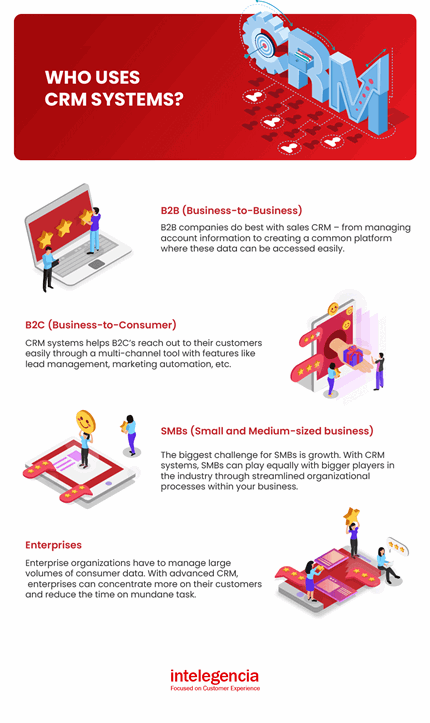
Who uses CRM systems?
Customer relationship management systems are customized to meet the specific needs of a business. Nowadays, CRM has become the best technological asset for collecting customer data and forecasting sales or market opportunities.
Enterprise Resource Planning (ERP)
Enterprise Resource Planning (ERP) systems integrate enterprise applications (called modules) such as purchasing, finance, human resources, and inventory management into one cross-functional system. Through ERPs, different departments can communicate and share information real-time, which eliminates inconsistencies and duplication of efforts during operations.
Some of the most basic CRM functionalities include:
- Accounting
- CRM
- Finance
- Human resources
- Inventory and order management
- Marketing
- Planning
- Purchasing inventory
- Sales
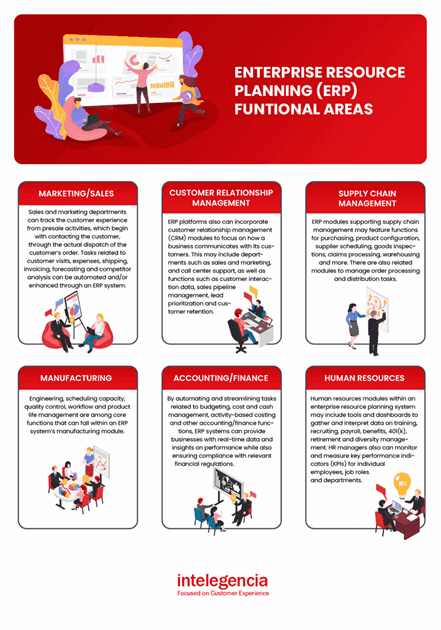
ERP’s Functional areas:
*Source: https://www.floridatechonline.com/
Supply Chain Management (SCM)
To provide businesses with a strategic advantage, Supply Chain Management (SCM) systems facilitate integrated partnerships and manages the flow of goods and services, including all processes that transform raw materials into final products.
A properly optimized CRM system can automatically process orders with suppliers and track each department’s efficiency when it’s being manufactured.
Some of the most basic SCM functionalities include:
- Procurement
- Product lifecycle management
- Inventory planning
- Enterprise assets and production lines maintenance
- Logistics (fleet management and transportation)
- Order management
- Global suppliers management
Benefits of Supply Chain Management
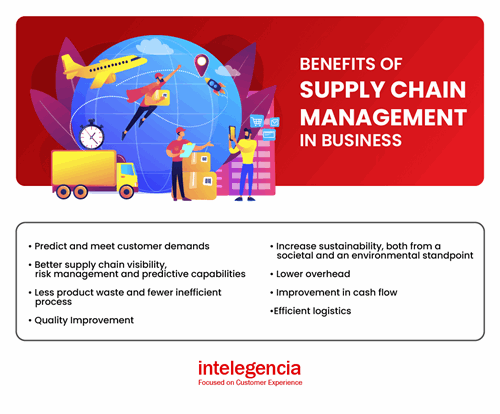
Overall, enterprise software development can significantly increase employee performance, improve the transparency of the business, and manage each department’s operational efficiency. It’s a matter of knowing which system fits your business needs the best.
]]>Every website has a mere few seconds to captivate and sway potential customers. To swiftly gain trust, establish brand recognition, and retain users, investing in UX optimization is an absolute necessity.
[ez-toc]
Ever wondered what lays down the foundation of a well-built website or an app? It’s the core UX Design principles at work. UX design focuses on simplicity, clarity, and accessibility while streamlining the user journey. With visual hierarchy, consistency, and responsiveness, it delivers seamless experiences. Research shows a well-crafted interface can increase conversion rates by up to 200%. Optimized UX design can push rates even higher, reaching 400%, meaning it is indispensable in shaping how we interact with digital products.
Essential UX design principles: 10 must-knows for success
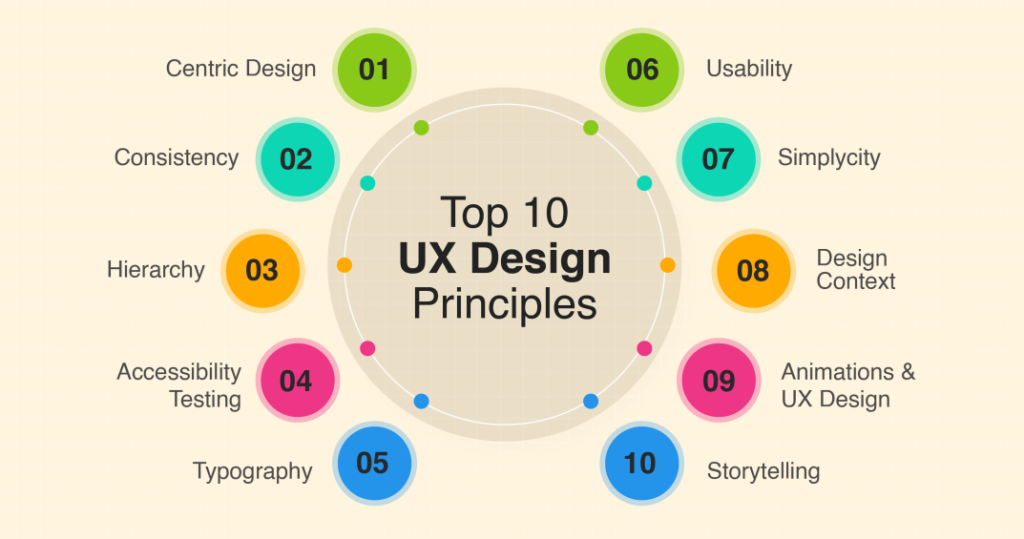
Let’s delve into the 10 most essential UX design principles to empower designers in creating intuitive, engaging, and user-centric digital experiences
1.Consistency
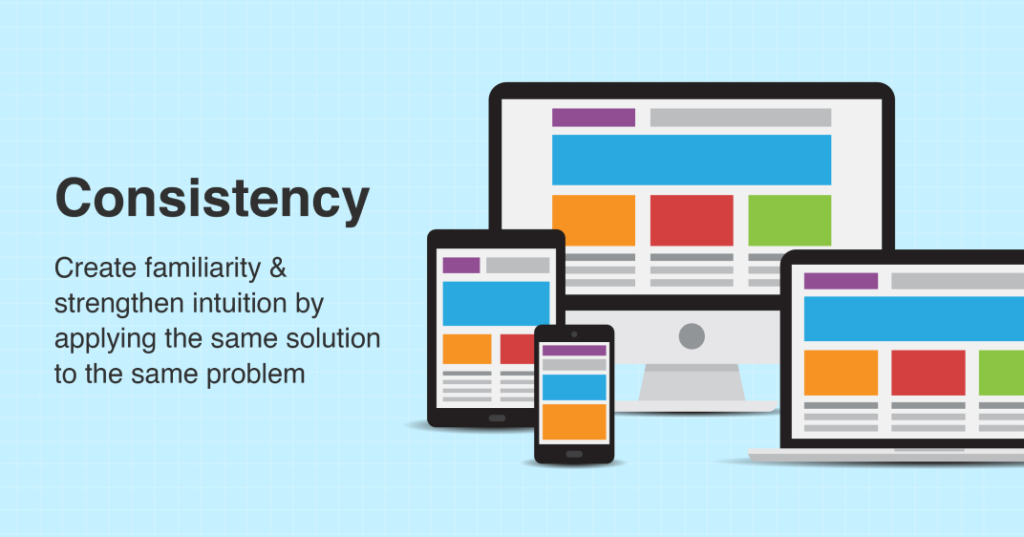
Consistency plays a vital role in UX Design, enabling users to navigate and interact with a product or service easily. By establishing consistent elements, predictability is fostered, reducing users’ cognitive load and enhancing usability.
Developers should prioritize consistency in UX Design by ensuring a unified approach across all aspects of the product. This includes maintaining consistent visual design, language, and interaction patterns throughout the user experience.
A notable example of consistency can be seen on Facebook’s platform. The “Like” button consistently features a thumbs-up icon, positioned in the same location across the interface. This consistent representation enables users to readily identify the button and intuitively understand how to interact with it.
2.Simplicity
Simplicity plays a crucial role in website and app design, enabling users to fulfill their needs quickly and effortlessly. A simple design reduces cognitive load, leading to a more satisfying user experience.
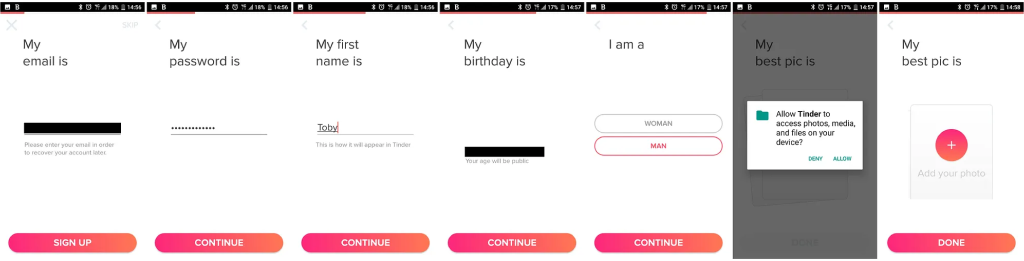
The Tinder app serves as a prime example of the importance of simplicity. The illustration below exemplifies that the app embraces a simple registration process that let users get on board in no time.
Another noteworthy example of simplicity in design can be found in Skype. As a popular video calling platform, Skype offers a visually appealing design while incorporating a dark mode feature.
By prioritizing intuitive interfaces, streamlined features, and uncluttered visuals, designers can elevate the user experience, allowing for effortless navigation and interaction with their products.
3.Navigation
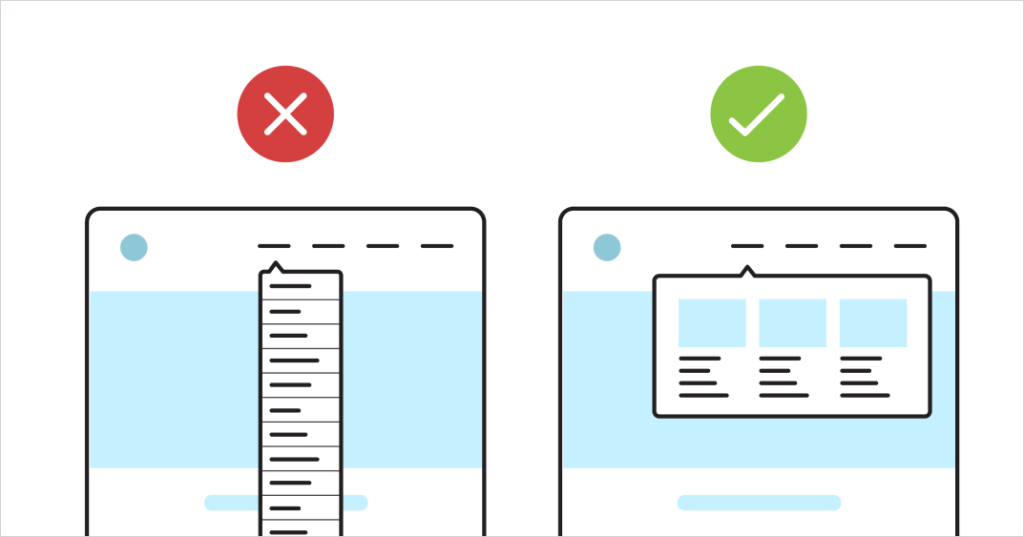
Simplifying navigation and providing a user-friendly experience is a fundamental principle of UX design. When users visit a website or app, it should be effortless for them to find the information they’re looking for.
Take Airbnb as an example of effective navigation in UX Design. The website boasts a well-designed and intuitive navigation system that allows users to effortlessly explore and discover their desired content. The menu is thoughtfully organized, making it easy for users to locate the information they need with minimal effort.
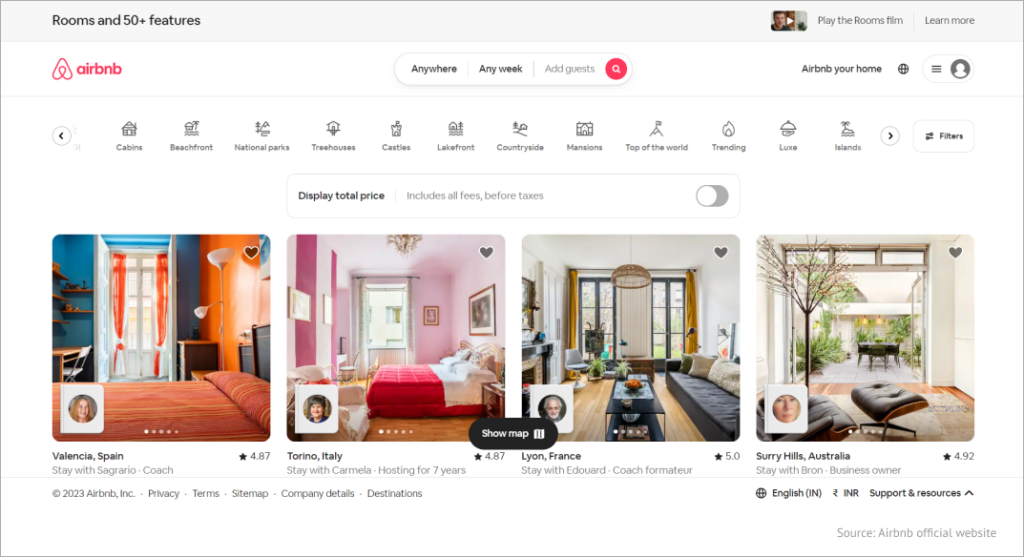
By prioritizing seamless navigation, UX designers create an environment where users can navigate with ease, enhancing their overall satisfaction and ensuring a positive user experience.
4.Accessibility
Accessibility is a fundamental UX Design principle that involves designing with considerations for people with disabilities, such as visual impairments, hearing impairments, and physical limitations.
To prioritize accessibility, UX Designers focus on optimizing various elements, including:
- Text readability: Ensuring that text is clear, legible, and easily comprehensible for all users, including those with visual impairments or reading difficulties.
- Overall contrast: Enhancing the contrast between text and background to make content more accessible to individuals with low vision or color blindness.
- Color scheme: Select colors that are inclusive and avoid relying solely on color cues to convey information, as some users may have difficulty perceiving or differentiating colors.
Bank of America’s mobile app serves as a notable example of incorporating accessibility into UX Design. By integrating accessibility features, designers make the app more inclusive and user-friendly, enabling individuals with diverse physical and cognitive abilities to fully engage with the product.
In the image below, we can see the app’s accessibility features in action. The text size and contrast are adjustable, making it easier for users with visual impairments to read and navigate the interface. Additionally, the app utilizes clear and intuitive icons, providing a more straightforward experience for individuals with cognitive challenges.
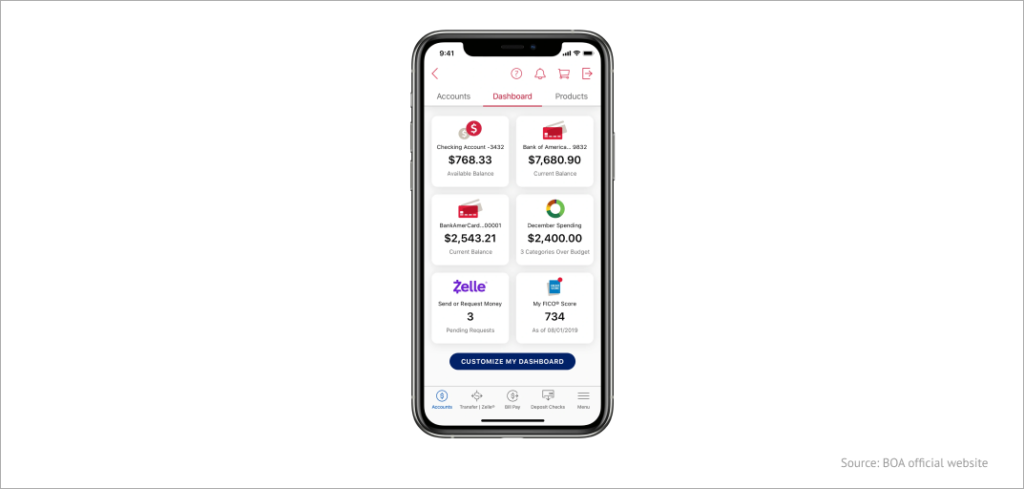
By incorporating accessibility into UX Design, Bank of America’s mobile app demonstrates a commitment to creating an inclusive digital environment. This approach allows users of all abilities to access and interact with the app, promoting equal opportunities and a positive user experience for everyone.
5.Hierarchy
In UX Design, hierarchy refers to the organization of elements on a page or screen based on their relative importance. It plays a vital role in helping users comprehend the relationship between different elements.
The website of The New York Times exemplifies the effective use of hierarchy in UX Design. Through logical and hierarchical information organization, designers enable users to access the desired content swiftly, resulting in a more user-friendly and satisfying experience.
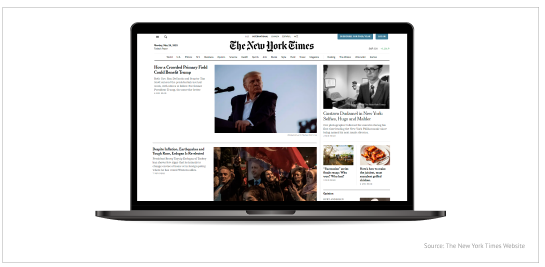
By establishing a clear hierarchy, designers facilitate efficient and effective user interactions. A well-crafted hierarchy reduces cognitive load and enhances the user experience by making the product more intuitive.
6.User-centricity
Putting the user at the center of UX Design is a fundamental principle that ensures products cater to their needs and expectations. This approach involves comprehending users’ goals, preferences, and behaviors and designing products accordingly. By adopting a user-centric mindset, designers can create intuitive, user-friendly, and enjoyable experiences.
An exemplary illustration of user-centricity is seen in Spotify. The platform is crafted with the user in mind, offering features that simplify music discovery and playlist creation. Leveraging machine learning algorithms, Spotify provides personalized recommendations based on users’ listening history, tailoring the experience to each individual.
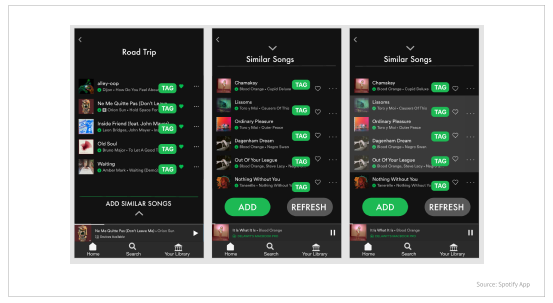
By prioritizing user-centric design, designers can enhance the overall user experience, creating products that resonate with users, fulfill their needs, and bring joy to their interactions.
7.Context
Considering the context is a crucial aspect of UX Design, focusing on the specific situations and environments in which a product or service is utilized. By understanding users’ needs and behaviors within various contexts, designers can create tailored products that effectively address those needs.
The role of context in UX Design is significant as it enables designers to develop intuitive, user-friendly, and enjoyable products. By incorporating context-specific considerations, designers can optimize the overall user experience.
Similarly, the Starbucks mobile app is designed to deliver a seamless experience when ordering and paying for drinks. The app recognizes the context of users who may be in a hurry or on the go. By acknowledging this context, the app streamlines the process, ensuring efficiency and convenience.
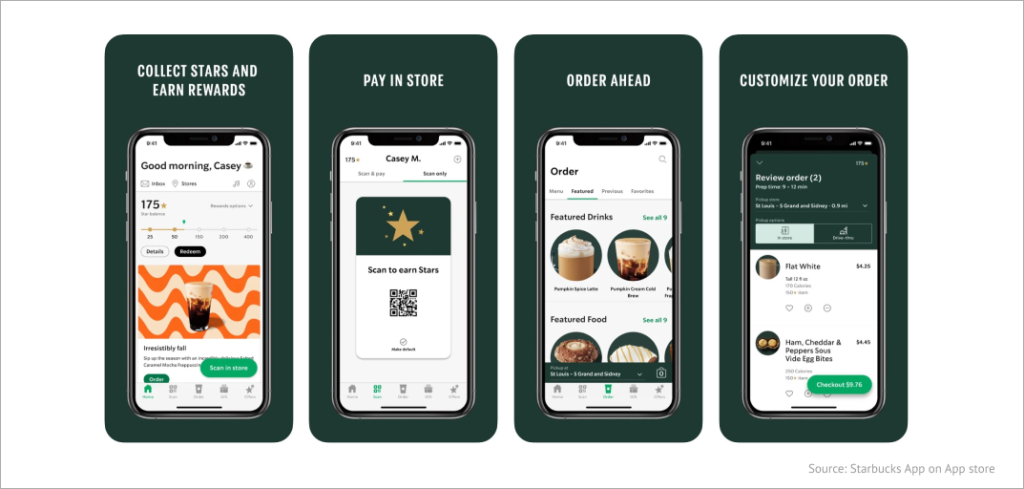
By prioritizing context in UX Design, designers can align products with users’ specific situations, leading to enhanced usability and overall user satisfaction.
8.Typography
Typography influences readability, visual hierarchy, brand identity, emotional impact, navigation, and accessibility. By paying attention to typography and making thoughtful design choices, designers can enhance the user experience, effectively communicate information, and establish a strong visual identity for the app or website.
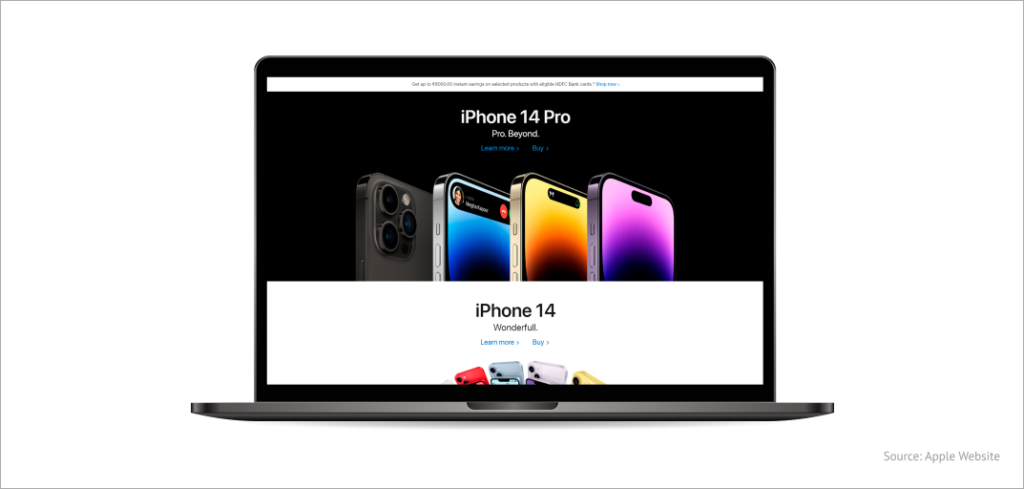
Apple’s website is a great example of how typography can boost the overall user experience. The use of explicit, readable fonts and deliberately chosen typefaces can make a significant difference in how users perceive and interact with a website.

9.Storytelling
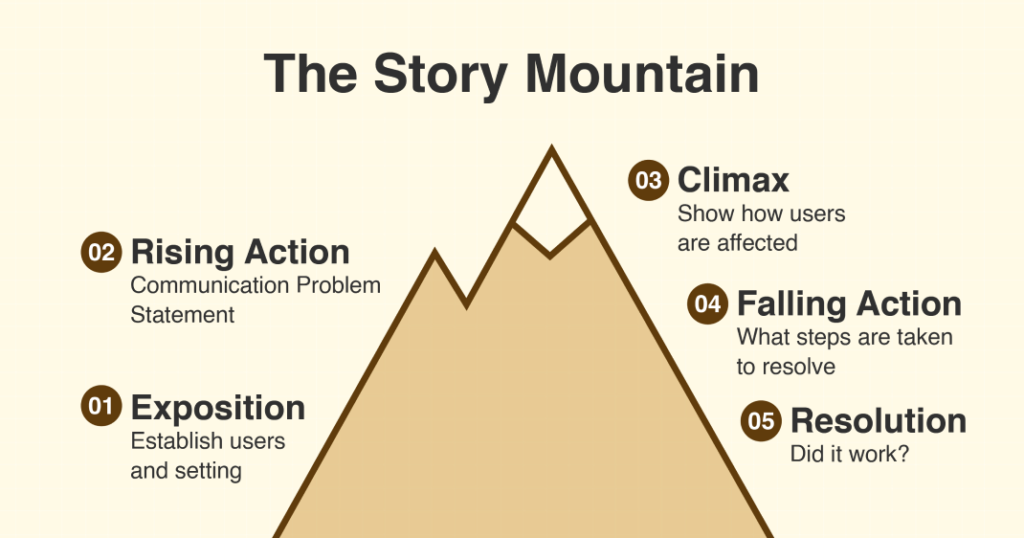
Storytelling in UX Design involves leveraging narrative elements and techniques to guide users seamlessly through digital interfaces, effectively communicate information, and evoke emotional connections.
A tangible instance of storytelling in UX Design can be observed in the onboarding experiences of mobile applications. During the app’s initial launch, a well-designed onboarding process can skillfully convey the app’s value, features, and usage instructions by employing a narrative flow.
To effectively utilize storytelling in UX Design, developers can employ the following practices:
- Conduct user research and develop user personas to gain a deep understanding of the target audience’s needs, goals, and motivations.
- Create user scenarios or stories to visualize the user journey and identify opportune moments for incorporating storytelling.
- Integrate storytelling elements, such as narratives, characters, or visual storytelling techniques, into the interface design.
- Utilize micro-interactions, animations, or transitions to instill a sense of progression and continuity throughout the user journey.
- Continuously test and iterate the storytelling elements based on user feedback to ensure their ability to engage and guide users seamlessly through the interface.
By embracing storytelling in UX Design, developers can forge connections with users, deliver information more impactfully, and heighten overall user engagement and satisfaction.
10.Familiarity
Familiarity in UX Design refers to the use of familiar elements and patterns from users’ past digital experiences, which enhances usability, efficiency, and overall satisfaction.
By incorporating design conventions that users are accustomed to, familiarity enables users to navigate interfaces effortlessly, reduces cognitive load, ensures consistency, meets user expectations, and improves accessibility. Leveraging familiar design elements allows developers to tap into users’ existing knowledge and create intuitive experiences.
One concrete example illustrating familiarity in UX Design is the standardized shopping cart icon commonly used in e-commerce websites. This icon, typically represented by a simple image of a cart, has become a universally recognized symbol for adding items to a virtual cart for purchase.
By incorporating this familiar icon, e-commerce websites leverage users’ prior experiences and expectations. Users can immediately understand that clicking on the shopping cart icon allows them to view and manage their selected items before proceeding to the checkout process.
Considering familiarity in UX Design, designers can enhance user experiences, streamline interactions, and facilitate seamless engagement with their interfaces.
However, it’s important to note that the term “Bag” has not gained widespread popularity in UX Design, despite its prevalence in apparel and fashion websites and its adoption by companies like Apple. While some websites have used “Bag” as an alternative to “Cart,” it may not be suitable for every context. In fact, it can potentially confuse users, so it’s advised to avoid its usage indiscriminately.
The preference for using the term “Cart” persists, as indicated by research conducted between 2007 and 2014 on call-to-action words used by major online retailers.
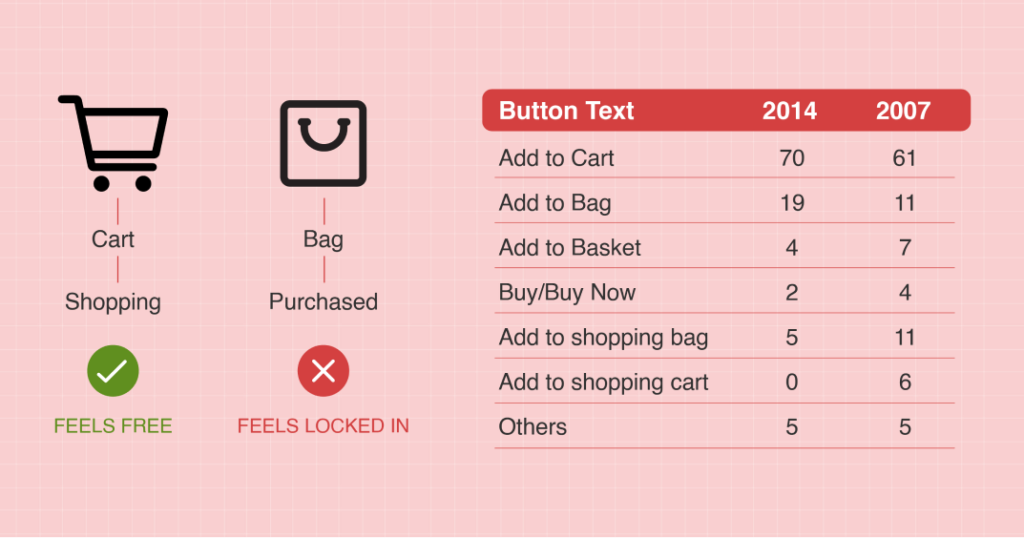
Localization also plays a significant role in terminology selection. Websites available in multiple languages face challenges in transitioning away from the term “Cart” because “Bag” may not make sense in all languages. For instance, in Dutch, “Shopping Cart” is used instead of “Bag” by a prominent European retailer like Zalando.
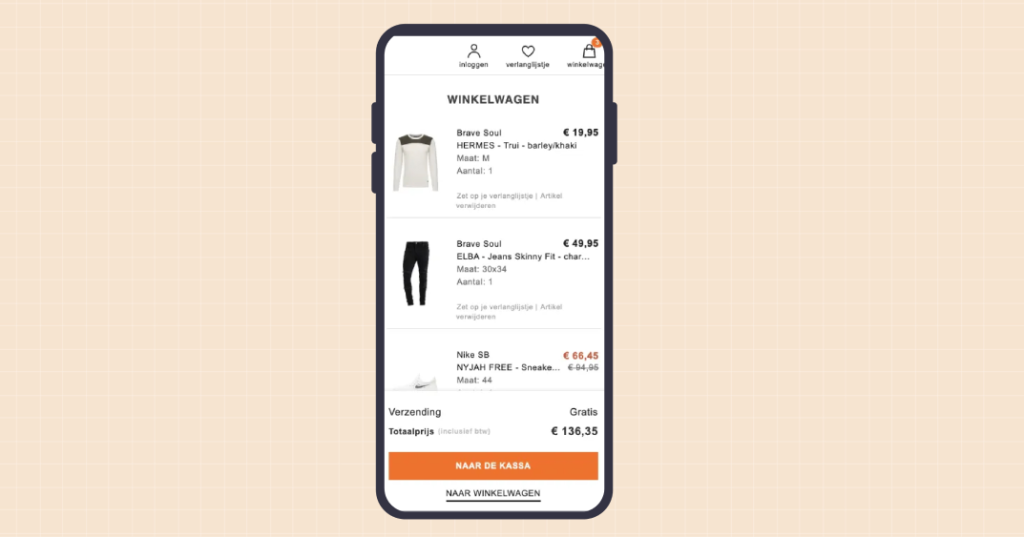
Similarly, languages such as Portuguese or Spanish may have cultural differences that influence the choice of terminology. Therefore, it’s crucial to consider these factors when deciding on terminology in UX Design.
Creating impactful designs: The importance of UX design principles
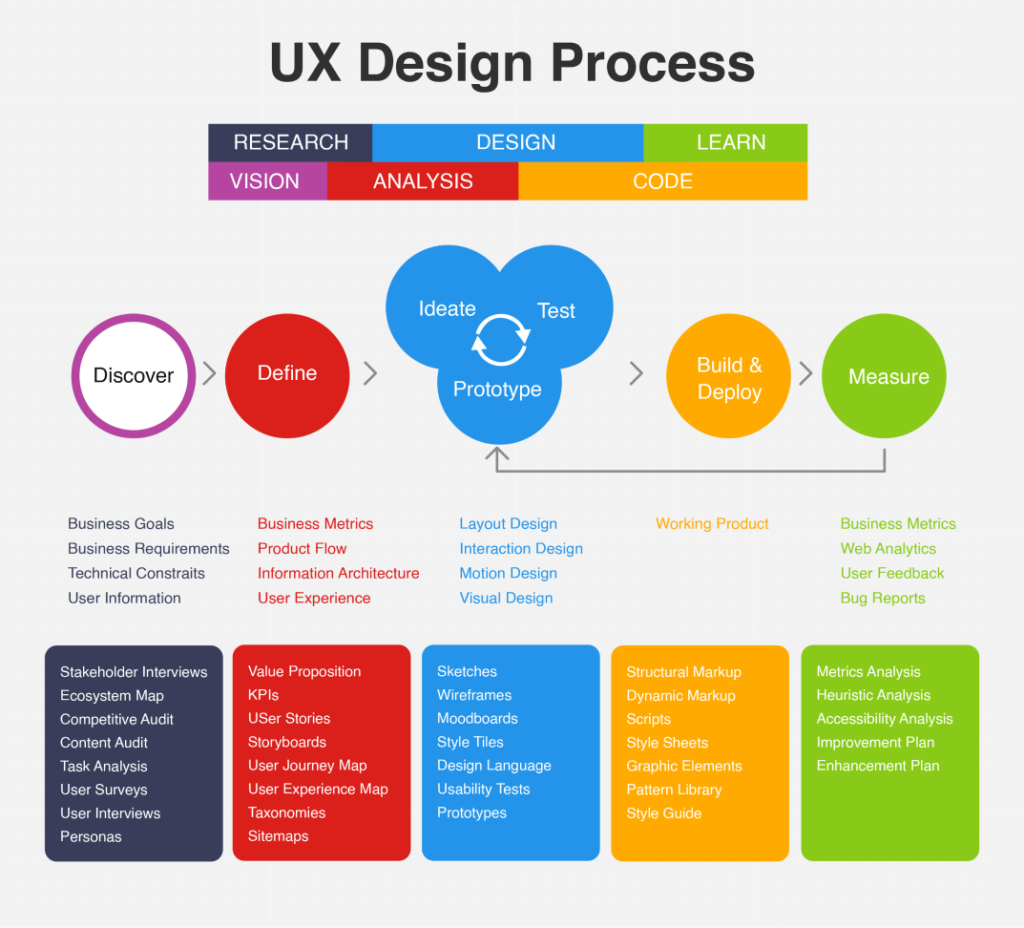
The principles of UX Design serve as a foundation for creating exceptional user experiences. Let’s understand the significance of these principles in detail:
1.User satisfaction
User satisfaction lies at the heart of UX Design, serving as the ultimate objective. Understanding how users feel about a product or service is crucial in creating meaningful experiences. By prioritizing user satisfaction, designers can ensure that their creations are not only functional but also captivating. A satisfying user experience not only enhances brand perception but also fosters user loyalty and drives higher conversion rates, contributing to the overall success of the product or service.
2.User retention
User retention plays a vital role in the success of an app or a website as it depicts how long or how frequently consumers will use the product or service. Paying attention to customer-centricity is important for designers to boost user retention for their products. Increased user retention can translate to a loyal user base, increased revenue, and a formidable brand presence.
3.Increased conversions
Increased conversions refer to the percentage of users who have taken a certain action, such as form filing or making payment. To improve conversions, the designer must incorporate compelling and clear calls to action, simplify the user journey, and enable users to make informed decisions. Paying attention to increased conversion can help designers can create products that are user-friendly and profit-churning.
4.Cost saving
Cost saving refers to the ability of the product to minimize costs relating to customer support, maintenance, and training. User-friendly products can mitigate the requirement for constant customer support and training, which can save resources and time. Plus, a tailored product seeks minimal updates and maintenance as it is less vulnerable to technical glitches.
5.Competitive advantage
Competitive advantage refers to the ability of a tailored product to stand out and create a unique value proposition. To keep the product competitive, designers must grasp the needs of their target audience and create products that are useful and has a unique value.
6. Brand loyalty
Brand loyalty deals with the emotional connection that users have with a brand. A fine-tuned product can boost user engagement and motivate users to share their positive feedback with others, ensuring amplified customer acquisition and brand presence. To maximize brand loyalty, designers need to tailor their products for improved output and emotional connection, leading to increased engagement.
UX design beyond today: Envisioning the future for web and apps
The following technologies will change the way UI Design for web and apps perform in the future:
1.AI
AI plays an increasingly imperative role in UX Design for web and apps, both now and in the future. AI can be utilized to improve the user experience by rendering personalized recommendations, minimizing repetitive tasks, and boosting accessibility.
In the future, AI is anticipated to play a game-changing role in UX Design. As AI technology evolves with time, designers will come across more sophisticated tools and techniques for creating responsive and intelligent products.
2.Augmented Reality (AR)
The role of Augmented Reality (AR) in UX Design is to facilitate users with immersive experiences that blend the digital and physical worlds. With the advancement of AR technology, designers will have more opportunities to create revolutionary AR experiences for users in the future. With AR, designers can create personalized experiences, augment accessibility, and improve user engagement.
3.Multi-sensory design
The role of multi-sensory design in UX Design is to create experiences by considering multiple senses like vision, sound, touch, smell, and taste. Multi-sensory design can serve various sectors, including education, entertainment, marketing, and so on. Through this, designers can provide users with an unforgettable experience.
In the future, multi-sensory design is likely to present developers with endless opportunities to create experiences fostering multiple senses. For example, spatial audio can be used to reinforce an unforgettable audio experience. Similarly, haptic feedback can be used to ensure an immersive tactile experience.
4.Voice User Interface (VUI)
Voice User Interface (VUI) in UX Design enables users to interact with digital products and services via voice commands, ensuring a hands-free experience. This will take the user experience to the next level. With the progression in technology with time, designers will have access to advanced resources to create innovative VUI experiences for users.
5.Personalization
With personalization, developers create experiences that are tailored to individual needs and preferences. Personalization implies providing users with relevant content, recommendations, and features that align with their interests and goals. In the time ahead, personalization in UX Design will be at a whole new level. It is likely to enable developers to create personalized experiences based on critical user data, including browsing history, location, and social media activity.
Elevate user experience: Intelegencia’s digital solutions at work
Investing in UX optimization is more than just a luxury; it has become a necessity. It is a strategic imperative to quickly establish trust, build brand recognition, and ensure user retention. The principles of effective web and app design for UX revolve around placing the user at the core of the design process. By understanding their needs, expectations, and behaviors, designers can create experiences that are not only visually appealing but also intuitive, seamless, and enjoyable.
At Intelegencia, we are passionate about crafting exceptional user experiences. We believe that every interaction should leave a lasting impression. If you share the same passion for creating outstanding user experiences, we invite you to join our talented team. Be a part of our mission to design captivating digital experiences that make a difference. Explore our career page here to discover exciting opportunities and become a valuable member of our team.
]]>“The difference between a software developer and a software engineer is the same as the difference between big and large.” — Unknown
Knowing that there are differences between the two is one thing, but it can be tricky to distinguish precisely these contrasts. Here are some of the key differences between software engineering and software development to help mitigate your confusion.
Introduction to Software Engineering
Software Engineering is a detailed field of study that refers to applying engineering principles from design to software development. Software engineering development analyzes the user’s needs to build an application using software programming languages.
For example: In today’s market, mobile devices offer similar hardware and processing power. However, the user experience differs depending on the software. The purpose of software engineering development is to analyze and create software that satisfies every consumer’s needs. Companies typically use these as a way to compete in the market. The better the user experience, the more customers they can pull in.
Software Engineer Duties and Responsibilities
The business environment relies heavily on software for many functions. A software engineer’s role is to oversee the entire software engineering development cycle from designing, testing, and developing software to meet a business’ specific needs. Given the role’s breadth, software engineers should have the technical expertise and extensive knowledge in using open-source tools.
The typical software engineer’s duties and responsibilities include:
- Identifying the issues and common patterns by developing standard operating procedures to improve the quality of a system
- Distinguishing and making recommendations on the areas that need improvement.
- Designing and implementing systems to enhance an application
- Maintaining and improving existing codebases
- Coordinating with colleagues to implement technical designs
- Investigating and using new technologies that are relevant to the process
- Providing and documenting written knowledge transfer material through diagrams and flowcharts and develop computer instructions through algorithms
Best Practices for Software Engineers
- Software Engineers should ensure that the products and related modifications meet the highest professional standards beneficial to the client and the employer
- Maintain integrity and self-sufficiency in their professional approach
- Promote ethical practice for software development and maintenance
- Assist and work hand-in-hand with the rest of the development team

Why is Software Engineering Important?
Software Engineering is an important part of business development. Engineers work to accommodate the ever-changing requirements and needs of the market.
- Large Software – As the size of software becomes large, software engineering helps provide a scientific process to applications to have the industry’s upper hand.
- Scalability and Adaptability– It is easier to recreate a new software than scale an existing one if the software process is not based on scientific and engineering concepts. Software Engineering adapts to the growth of every business or the changes in the market needs. This allows your business to expand as much as it is necessary.
- Limited Software Cost – The most significant driving force in software engineering is cost though the cost of computers and hardware manufacturing has significantly decreased, companies would preferably invest in perpetually licensed software than purchase a tool that still needs to be installed on different devices.
- Dynamic Nature – The nature of the software is always growing and adapting. Software Engineers create a viable solution depending on the environment in which the user works.
- Quality Management – Software Engineering offers a better and theoretical software development method to provide quality software products that cater to the client’s specific needs.
Introduction to Software Development
Software Development is the driving force behind every creative program in software. It refers to the process which programmers follow to build computer programs such as photoshop, mobile apps, and web apps.
While software development refers to everything related to creating programs, its more specific version is Software Development Life Cycle (SDLC), which refers to a series of steps for building end-user products that meet the user’s technical specifications and requirements.
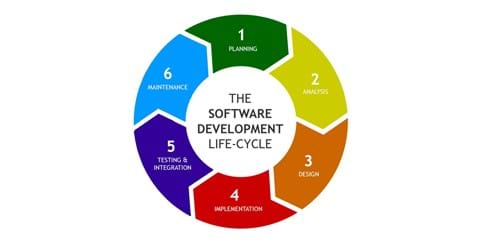
Software Developers are responsible for the overall development of software. Developers work on specific project areas to create appropriate programming codes that help the software function smoothly.
Software Developers Duties and Responsibilities
The role of a Software Developer depends on the client’s needs. A Software Developer is a mastermind behind computer programs. Their job is to analyze the user’s demands and focus on creating, testing, and developing a complete functioning program to improve user experience.
With such a complex role, Software Developers must have a good balance of hard and soft skills. These professionals must possess excellent analytical abilities and precise technical knowledge required to enhance the software regularly.
The typical Software Developer’s duties and responsibilities include:
- Providing technical guidance and overseeing the entire development process of the product
- Researching, designing, implementing and managing software programs
- Developing a well thought out plan to meet a client’s needs
- Conducting experimental software to ensure quality and consistency
- Writing and implementing efficient code
- Developing quality assurance procedures
- Maintaining and upgrading existing systems
- Building tools for improving internal productivity
Best Practices for Software Developers
- Understand and create a code that will help drive the overall business.
- Generate program code and use it effectively in a project
- Document coding goals and map out how to approach immediate coding tasks
- Start working on the most challenging part of the project
| KEY DIFFERENCES BETWEEN SOFTWARE ENGINEERING AND SOFTWARE DEVELOPMENT |
| SOFTWARE ENGINEERING | SOFTWARE DEVELOPMENT |
| Application of software engineering principles for designing, development, maintenance, testing, and evaluation of computer software. | Builds software which runs across various types of computer. |
| Software Engineering is a team activity. | Software Development works primarily a solitary activity. |
| Software Engineering works on components with other engineers to build a system. | Writes a complete program. |
| Creates the tools to develop software | Works with readymade tools to build applications |
| Software Engineering solves issues on a much larger scale | Does everything that software engineers do but on a limited scale |
Both software engineering and software development have a bright scope in the IT and business industry’s future. The key difference between software engineering and software development lies in its responsibility. Software Engineering focuses solely on engineering, while software development creates a completely functional program.
]]>